Why isn't Siri working?
Siri requires your permission before it will allow Next3Trains to return your trains this way. This is why there is a prompt at the top of the app to ask for the user to enable Siri - iOS will then pop up a system prompt to give the app permission to be called via Siri. Once this is done, you can ask Siri for your next trains even if the app is not running (ie ask via voice when you’re in the car, pulling into the railway station parking).
If you’ve dismissed that prompt, or you later change your mind, you can always ask Siri while the app is open in the foregound - ask Siri to “Check my trains in Next3Trains”. This should also pop up the system prompt for permissions. If that doesn’t work, you can enable this via the Shortcuts app: from the Library view, scroll down to Next3Trains in the list of apps and click on it, press the (i) button, and ensure the Siri permission is enabled.
Note that while “Check my trains” is the default phrase to ask Siri, the following will also work:
- “Check trains in Next3Trains”
- “Show my trains in Next3Trains”
- “What are my trains in Next3Trains”
- “Next trains in Next3Trains”
- “Train times in Next3Trains”
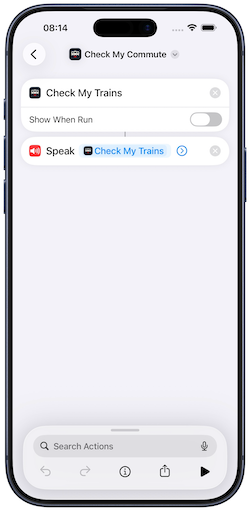
By default the “in Next3Trains” part of the phrase will be needed, however if you want to have your own phrase you can do this with Shortcuts - create a shortcut named with the unique phrase you would like to use, and add the Check My Trains action. You should then be able to get your trains via “Hey Siri, ”. Your shortcut should look something like the below if you want this spoken to you.