Why isn't Siri working?
Justin Clarke-Salt
Siri requires your permission before it will allow Next3Trains to return your trains this way. This should happen the first time you try and use Siri to have Next3Trains return anything. Once this is done, you can ask Siri for your next trains even if the app is not running (ie ask via voice when you’re in the car, pulling into the railway station parking).
Since version 1.11 Siri also shows the answer: a card with your route and a row for each train - time, destination, platform and status - appears while Siri reads the departures out, with a short line such as “Next trains from Leeds to York” on screen.
If you’ve dismissed that prompt, or you later change your mind, you can always ask Siri while the app is open in the foregound - ask Siri to “Check my trains in Next3Trains”. This should also pop up the system prompt for permissions. If that doesn’t work, you can enable this via the Shortcuts app: from the Library view, scroll down to Next3Trains in the list of apps and click on it, press the (i) button, and ensure the Siri permission is enabled.
On iOS 27, if Siri answers “Next3Trains is not enabled to do this with Siri”, it’s the same permission under a new name: iOS 27 asks for each app separately, and until you’ve agreed every phrase gets that answer. Say just “Next3Trains” to Siri and accept the prompt, or turn Siri on for the app under Settings → Apps → Next3Trains.
Note that while “Check my trains” is the default phrase to ask Siri, the following will also work:
- “Next3Trains”
- “Next3Trains trains”
- “Next3Trains check trains”
- “Check trains in Next3Trains”
- “Show my trains in Next3Trains”
- “What are my trains in Next3Trains”
- “Next trains in Next3Trains”
- “Train times in Next3Trains”
Since version 1.11 you can say “with” instead of “in” - “Check my trains with Next3Trains”, “Check trains with…”, “Show my trains with…”, “Next trains with…”, “Train times with…” - and “Check my trains using Next3Trains” works too.
If Siri struggles with “Next3Trains”, it will also answer to “Next Train”, “Next Trains” and “Three Trains”.
If you’ve made a shortcut of your own with the same name as one of the app’s actions - “Check My Trains”, “Get Train Times” or “Next Trains To Station” - Siri may run your shortcut instead of the app’s action. Rename or delete it and the built-in one takes over.
If Siri shows your trains but doesn’t read them out, that’s the Siri Responses setting in the Siri settings: on Automatic, Siri decides for itself whether to speak. Choose Prefer Spoken Responses to always have them read.
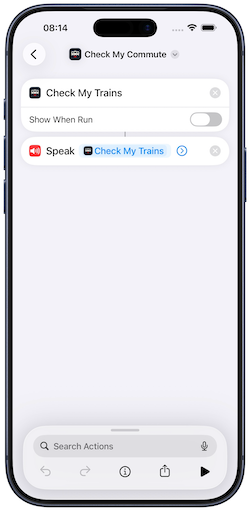
By default the “in Next3Trains” part of the phrase will be needed, however if you want to have your own phrase you can do this with Shortcuts - create a shortcut named with the unique phrase you would like to use, and add the Check My Trains action. You should then be able to get your trains via “Hey Siri, the name you used”. Your shortcut should look something like the below if you want this spoken to you.
On Apple Watch
The watch app has its own Siri support, so you can raise your wrist and ask there too. On watchOS the phrase is “Check My Trains in Trains” - the watch also answers to “My Trains” and “Three Trains”. The destination phrases below work there as well (“Next trains to London Bridge in Trains”); the watch speaks the answer rather than showing a card.
What Siri will read out
You can tune how much detail Siri reads back in the app’s Settings - there are toggles to include the operator, the number of coaches, the reason a train was cancelled, and (since version 1.9) the reason a train is delayed. All four are off by default to keep the answer short.
Can I ask Siri about a different route?
“Check my trains” always answers for your most relevant saved route - worked out from your location, your widget, or the route you last looked at.
Since version 1.11 you can also name a destination: “Next trains to London Bridge in Next3Trains”. The trains leave from the departure station of that same most relevant route, and the destination doesn’t have to be one you’ve saved. These all work:
- “Next trains to London Bridge in Next3Trains” (or “Next train to…”)
- “Trains to London Bridge in Next3Trains”
- “Train times to London Bridge in Next3Trains”
- “Departures to London Bridge in Next3Trains”
- “When’s the next train to London Bridge in Next3Trains”
- “Show me the next trains to London Bridge in Next3Trains”
- “Next3Trains trains to London Bridge”
“Next trains to…”, “Trains to…”, “When’s the next train to…” and “Show me the next trains to…” can end “with Next3Trains” instead, and “Next trains to London Bridge using Next3Trains” works too.
On iOS 27 with Siri AI, Siri can find any of the 2,612 stations this way. On earlier versions it recognises a shortlist of about 25 - the stations in your saved routes, ones you’ve picked recently, and the major hubs. See Siri and Apple Intelligence in iOS 27.
You can’t name both stations by voice. For that there’s a Get Train Times action in the Shortcuts app. It isn’t voice-activated on its own, but you can wrap it in a shortcut and give that shortcut a name you can say. See Using Next3Trains with Shortcuts.